If you’re like me, you like deals.
I don’t like to spend more money than I have to, and when it comes to audio gear, I’m usually willing to buy stuff that’s a few years old in order to save some cash.
But the music industry is a competitive one, and decisions like these have their drawbacks: namely, if you don’t get with the times, your music will be left sounding flat and muddy compared to the dynamic, ultra-clear recordings put out by today’s big names.
That’s one of the reasons I was so pumped to test out Focusrite’s recent 4th generation line of Scarlett products, specifically the 18i20 audio interface.
With upgraded converters, improved dynamic range, and a host of other time-saving and quality-enhancing features, the 18i20 addresses all the problems I’ve faced—ensuring my recordings stay on par with the latest industry standards without breaking the bank.
In this review, I’ll give you my raw impressions of Focusrite’s 4th Generation Scarlett 18i20, highlighting its standout features and how it solves common recording challenges.

Overview
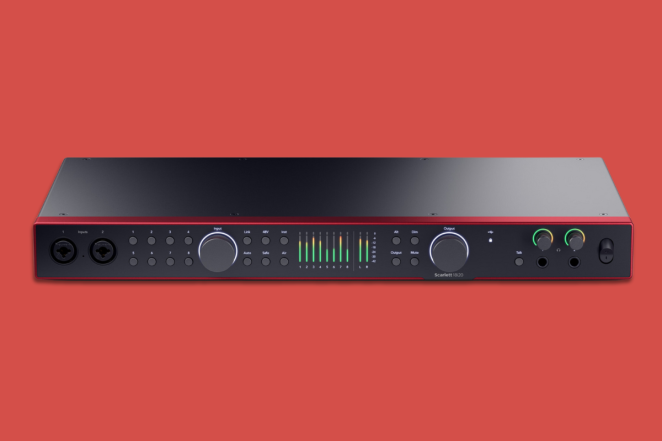
The Scarlett 18i20 4th Generation is a professional-grade audio interface with 18 inputs (including mic, line, and MIDI), 20 outputs, USB-C connectivity, and ADAT functionality which can add eight additional input and output channels. It retails at $649.99.
Unboxing my Scarlett 18i20, I found:
- A 1.5m USB-C cable for connection to my computer;
- A USB-C to USB-A adapter for older computers that don’t have USB-C inputs;
- An IEC power cable.
I was extremely excited to get my hands on a 4th Generation Scarlett interface, and even more excited to find that it absolutely lived up to the hype.
Here are my favorite things about the new 18i20.
Why I Like It
- New converters and a 122dB dynamic range results in crystal clear audio quality.
- Automatic gain controls help set ideal levels and prevent clipping.
- ADAT functionality allows you to add more inputs as needed.
- The re-engineered Air Mode comes with two stages, Air Presence and Harmonic Drive.
- The built-in talkback microphone streamlines your recording setup.
Features & Benefits
All in all, I was extremely impressed with the 18i20 during the weeks that I used it—but there were a few areas where it really stood out from the crowd.
Below, I’ll summarize my top five favorite features from the 4th Generation Scarlett 18i20.
Crystal Clear Audio Quality
Quite obviously, high audio quality is the number one most important feature for an interface. You need a device that can capture and reproduce the full range of your music—bass, mids, and treble—without distortion or noise.
This ensures your projects meet industry standards, whether for streaming, radio, or other professional uses, and it also means you’ll spend less time fixing problems in post-production—something I’ve burned way too many hours on myself.
But achieving crystal clear audio is no easy feat, requiring complicated components like converters, which transform analog sound into digital signals, as well as a high dynamic range, which is a measure of the full volume range a system can capture without distortion.
For its 4th Generation of Scarlett products, Focusrite has completely re-engineered its audio circuitry and integrated the same professional-grade converters from its flagship RedNet range, giving the 18i20 a stunning 122dB dynamic range, up from the 111dB offered in the 3rd generation.
Now, I’m pretty familiar with Focusrite, and the Scarlett line in particular. Until Focusrite shipped me this 18i20, my regular interface was a 3rd Generation Scarlett 4i4.
I can personally attest to the fact that Focusrite has really upped the game with this new 4th Generation line. I can really hear the difference in overall clarity, and the huge dynamic range allows me to capture both the soft nuances and high peaks of my recordings.
Automatic Gain Controls
Input gain is the level of amplification applied to the audio signal coming from your microphone. Increasing the gain makes quiet sounds louder so they can be properly recorded without distorting the original sound quality.
Manually setting gain can be time-consuming and tricky, especially for beginners or in high-pressure recording scenarios. You could record 100 different times in search of that perfect take, only to discover that your input gain was slightly too high, ruining all your hard work with clipping.
The Scarlett 18i20 4th Gen features Auto Gain and Clip Safe features, which work together to ensure optimal input levels and prevent distortion.
- Auto Gain listens to your input for 10 seconds and sets the ideal level based on how loud your performance is.
- Clip Safe continuously monitors and adjusts the gain to prevent clipping, even during unexpected volume spikes.
I really appreciate features like these from Focusrite, because they make life better both for beginners and experts. Beginners won’t have to obsess over ruining takes with the wrong gain levels, and experienced users can focus on their performance instead of constantly adjusting settings.
Flexible Inputs & Outputs with Expandability
The usefulness of an audio interface often depends on how many microphones or line instruments you can connect to it simultaneously—and how many speakers you can route it to on the back end. Many people spend big bucks on interfaces with a low number of ins and outs, only to realize shortly that their new songs need more inputs to be properly recorded.
To mitigate this problem, you could invest thousands into a gigantic interface that has more ins and outs than you’d ever need—but better yet, you could use an interface that supports scalable expansion, allowing you to add more inputs and outputs as needed.
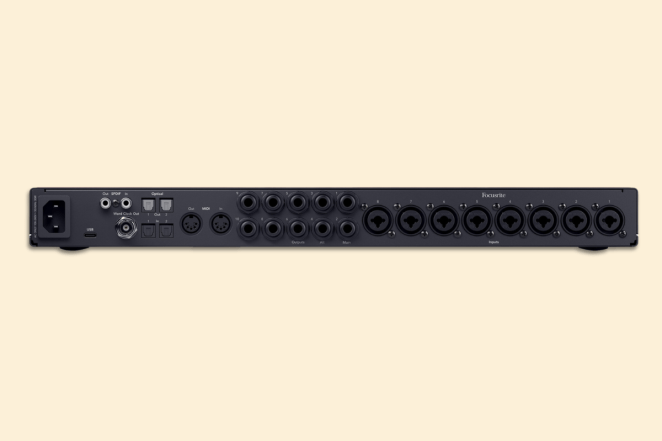
As its name implies, the Scarlett 18i20 comes with 18 inputs and 20 outputs, which is already enough for most small band setups. But even beyond that, it includes dual ADAT ports and S/PDIF, both of which allow you to expand your setup with additional preamps and digital gear.
You can use the ADAT ports to connect the 18i20 to a device like the Scarlett OctoPre or even just another 18i20—which effectively gives you an additional eight or 18 input channels, respectively.
Music is a journey, and you never know where it will take you. You could be sitting on a stool with an acoustic guitar and a single vocal mic in 2024, not knowing that by 2025 you’ll need to track a full string section. The Scarlett 18i20’s expansion capabilities ensure you can do both.
Re-Engineered Air Mode with Air Presence & Harmonic Drive
I’ve already talked a bit about Focusrite’s Air Mode in my review of the Clarett+ 8Pre. Essentially, it’s a feature that you can switch on to enhance the presence and character of your recordings, emulating the warm sound of the coveted analog preamps from back in the day.
The Scarlett 18i20 4th Generation features a completely re-engineered Air Mode with two separate modes:
- Air Presence: Introduces an all-analog filter circuit that delivers the sonic clarity of the original Focusrite recording console, ideal for vocals, acoustic instruments, or drum overheads.
- Harmonic Drive: Adds rich harmonics to recordings by emulating the characteristics of vintage preamps and the classic ISA sound.
The 4th Gen 18i20’s ability to choose either of these different stages, as opposed to just the Generic “Air Mode” offered in the 3rd Generation, gives you much more control over your sound, allowing for a more tailored approach to recording your songs.
Built-In Talkback Microphone
A talkback microphone allows producers and engineers to speak directly to performers through their headphones during recording sessions. Though it may not seem like much, this feature is crucial for large recording sessions with multiple band members who are all in separate rooms.
The Scarlett 18i20 4th Gen includes a dedicated built-in talkback microphone that’s easy to activate either through the interface itself or the Focusrite Control 2 app.
Coordinating and setting up a recording session is already time-consuming enough, and hooking up separate talkback microphones only adds to the madness. Thanks to the engineers over at Focusrite, this is something you’ll never have to worry about with the Scarlett 18i20.
Things To Consider Before Buying
If you like the sound of Scarlett’s 4th Generation line but the 18i20 isn’t for you, here are some of Focusrite’s other 4th Generation interfaces:
- The Scarlett 2i2 has two inputs and two outputs, making it perfect for singer-songwriters on a budget. Though it’s definitely a lower-tier offering compared to the 18i20, it still has some of the 4th Generation’s killer features, such as the automatic gain controls.
- The Scarlett 4i4 is one step up from the 2i2, with four inputs and four outputs. A lot of producers make the jump up to a 4i4 when they want to add a third speaker, such as a subwoofer, to their setup. It’s perfect for singer-songwriters who are looking to get into more heavy-duty production or recording with band members.
- The Scarlett 16i16 and 18i16 fall just below the 18i20, with 16 in/16 out and 18 in/16 out, respectively. These two come with all of the features of the 18i20, except for the built-in talkback microphone. I recommend these two for musicians and producers who are looking to record full band setups, but who might not need the full 20 outputs offered by the 18i20.
Before you make your decision one way or the other, there are a few key factors to keep in mind to ensure you choose the right audio interface for your needs.
- Audio quality: Like I mentioned earlier, the most important feature for any audio interface is the ability to accurately record the sounds from your microphones or line inputs. All the fancy features in the world won’t matter much if your overall sound quality is subpar. To make sure you find an interface with high audio quality, keep your eye on the quality of the converters, which determine how well the interface translates analog signals into digital, and the dynamic range, which ensures that both quiet and loud sounds are captured without distortion.
- Input and output configuration: The number and type of inputs and outputs an interface offers can make or break your setup. If you’re recording multiple instruments or using external gear, you’ll need plenty of inputs to capture everything. Outputs are also important, because they determine how many speakers, headphones, or other devices you can send your audio to. To make sure an interface meets your needs, research how many channels it can handle, the type of connections it offers (i.e. XLR, TRS, ADAT), and whether it can expand with additional equipment if needed at some point down the line.
- Connectivity: A good audio interface will obviously need to connect to your computer. USB-C is the gold standard connection type as of 2024, while other connections like Thunderbolt, Firewire, or USB-B are a bit outdated. Check the interface’s compatibility with your computer to avoid connectivity issues, and make sure the interface supports any other peripherals or external devices you might need, like MIDI controllers or external digital converters.
Check out our full guide to the best audio interfaces to learn more.
Conclusion
To recap, the 4th Gen Scarlett 18i20 is easily one of the top audio interfaces in its class—and at a retail price of $649.99, you’d be hard-pressed to find a better bang for your buck.
To recap, here’s why I love this interface so much:
- Crystal clear audio quality thanks to the re-engineered circuitry, RedNet converters, and 122dB dynamic range;
- Automatic gain controls that set optimal input levels and prevent clipping;
- Expandable inputs and outputs via ADAT and S/PDIF;
- Re-engineered Air Mode with two separate stages, Air Presence and Harmonic Drive;
- A built-in talkback microphone that facilitates easy communication.
If you’re looking to really make the jump into the big leagues, the Scarlett 18i20 4th Generation should be the first place you look.